.png&w=2048&q=75)
Amazon EC2 is often described as a virtual machine in the cloud, but that description is too simplistic for how it is actually used in real systems. EC2 offers a wide range of instance types and pricing models, and the choices made at this level directly affect performance, reliability, and cost. Before running production workloads on AWS, it is important to understand how these pieces fit together.
Amazon EC2 (Elastic Compute Cloud) is a core compute service of Amazon Web Services that provides configurable virtual servers in the cloud. EC2 allows users to provision compute resources on demand, with direct control over CPU, memory, storage, and networking.
Rather than offering a single “standard” virtual machine, EC2 exposes compute as a flexible system that can be adapted to different workload requirements. This is why EC2 serves as the foundation for many higher-level AWS services and custom cloud architectures.
Typical workloads running on EC2 include:
The value of EC2 lies not in what it can run, but in how precisely it can be shaped to match workload characteristics.
At its core, an EC2 environment is composed of three loosely coupled building blocks: AMIs, EBS volumes, and Security Groups. This separation is intentional. It allows compute, storage, and network policy to evolve independently rather than being locked into a single server configuration.
AMIs define how instances are created and reproduced, EBS provides persistent storage that survives instance replacement, and Security Groups enforce network boundaries without requiring instance restarts. Together, these components make EC2 environments disposable, repeatable, and easy to automate—qualities that are essential for scaling and operating systems reliably in the cloud.
EC2 operates within AWS Regions, each of which contains multiple Availability Zones. An Availability Zone is an isolated infrastructure unit with its own power, networking, and physical hardware. EC2 instances and their attached EBS volumes are always placed within a single Availability Zone. This design encourages architectures that rely on redundancy and automation rather than individual server reliability. EC2 systems are therefore built to tolerate failure and recover through scaling and replacement, rather than manual intervention.
Within this model:
In Amazon EC2, an instance type represents a fixed combination of CPU, memory, network bandwidth, and disk performance. These characteristics are encoded directly in the instance name rather than described separately.
The naming format follows a consistent structure:
c7gn.2xlarge
││││ └─ Instance size (nano, micro, small, medium, large, xlarge, 2xlarge, ...)
│││└────── Feature options (n = network optimized, d = NVMe SSD)
││└──────── Processor option (g = Graviton, a = AMD)
│└───────── Generation
└────────── Instance family (c = compute, m = general, r = memory, ...)
Each part of the name communicates a specific technical choice rather than a performance ranking.
Examples:
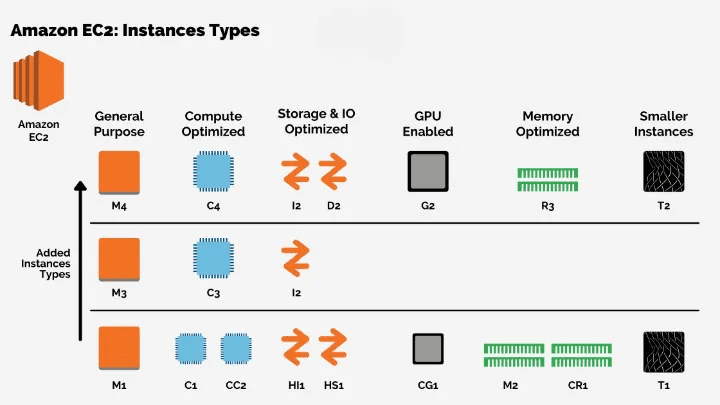
So why does EC2 have so many instance types? Different workloads place pressure on different system resources, which makes a single virtual machine configuration inefficient across all use cases. Because these resource demands scale independently and have different cost profiles, EC2 exposes multiple instance families instead of forcing all workloads onto a single generalized machine type.
Each EC2 instance type is defined by a small set of technical dimensions that directly affect workload behavior. Instance families exist to emphasize different combinations of these dimensions rather than to provide progressively “stronger” machines.
Once you understand how instance types are named, the next question is how to choose the right category for a given workload.
General purpose instances are designed for workloads that do not have a clear performance bottleneck. In these cases, CPU, memory, and network usage tend to grow together rather than being dominated by a single resource.
M-Series (M5, M6i, M6a, M7i)
T-Series (T3, T4g)
When application performance is constrained primarily by CPU throughput rather than memory or I/O, compute optimized instances become a more appropriate choice.Compute optimized instances target workloads where high and consistent CPU performance is the limiting factor, such as batch processing, ad serving, video encoding, gaming, scientific modeling, distributed analytics, and CPU-based machine learning inference.
C-Series (C5, C6i, C7i)
Performance characteristics
Memory-optimized instances are intended for workloads where performance is limited by memory capacity or memory access speed rather than CPU throughput. These instances are commonly used for open-source databases, in-memory caches, and real-time analytics systems that require large working datasets to remain in memory.
R-Series (R5, R6i, R7i)
X-Series (X1e, X2i)
When workloads require parallel processing beyond what CPUs can efficiently deliver, GPU-accelerated instances become relevant. Accelerated computing instances are used for workloads that rely on GPUs for training, inference, graphics rendering, or other forms of hardware acceleration, including generative AI applications such as question answering, image generation, video processing, and speech recognition.
|
Instance Family |
Primary Purpose |
Optimized For |
Typical Use Cases |
|
P-Series (P3, P4, P5) |
Machine learning training |
Large-scale parallel computation |
|
|
G-Series (G4, G5) |
Graphics & ML inference |
Real-time rendering and low-latency workloads |
|
In some systems, performance does not depend on CPU or memory at all. The main bottleneck comes from disk latency or throughput. Storage optimized instances are built specifically for workloads where fast and consistent disk access is critical. These instances rely on local storage rather than network-attached volumes. They are commonly used in systems that perform large volumes of reads and writes or process data directly from disk.
I-Series (I3, I4i)
D-Series (D3)
HPC optimized instances serve a narrow but demanding class of workloads. These workloads require tightly coupled computation across many cores and extremely low-latency communication. They are not general-purpose and are rarely used outside specialized domains. This category is most commonly seen in scientific research, engineering simulations, and financial modeling. Performance depends as much on networking and memory bandwidth as on raw CPU power.
Hpc-Series (Hpc6a, Hpc7a)
Key characteristics
Amazon EC2 offers multiple pricing models to match different workload characteristics and risk tolerances. These models differ mainly in flexibility, cost efficiency, and tolerance for interruption. Choosing the right pricing option is part of the compute decision, not a step that comes after deployment.
EC2 pricing can be grouped into four main options.
On-Demand instances follow a pay-as-you-go model where users are charged only for the compute time they actually use. There is no long-term commitment, which makes this option straightforward and predictable. The trade-off is cost, as On-Demand pricing is the most expensive option per unit of compute.
Key characteristics
Typical use cases
Spot Instances provide access to unused EC2 capacity at significantly lower prices compared to On-Demand instances. The pricing is driven by supply and demand, which means availability is not guaranteed. As a result, Spot Instances are best suited for workloads that can tolerate interruption.
How Spot Instances work
Spot usage strategies
Best practices
Savings Plans and Reserved Instances reduce cost by trading flexibility for long-term commitment. Both models are designed for workloads with stable and predictable usage. The main difference lies in how much flexibility users retain after making the commitment.
Savings Plans (AWS recommended)
Types of Savings Plans:
Reserved Instances
Types of Reserved Instances:
|
Payment Model |
Flexibility |
Discount |
Typical Fit |
|
On-Demand |
Very high |
None |
Unpredictable or short-term workloads |
|
Spot |
Medium |
Up to 90% |
Fault-tolerant workloads |
|
Savings Plans |
High |
Up to 72% |
Steady compute usage |
|
Reserved Instances |
Low |
Up to 75% |
Long-term, predictable workloads |
EC2 is not difficult because of its features. It becomes difficult when teams treat instance selection and pricing as afterthoughts instead of design decisions. Once you start from the workload itself—how it behaves, where it is constrained, and how stable it is over time—most EC2 choices stop feeling abstract and start making sense.
If you are running workloads on AWS and want to sanity-check your EC2 choices with someone who looks at usage before tools, Haposoft works with teams on practical cloud setups based on how systems are actually used. If you need a grounded technical discussion rather than a sales pitch, that’s usually where the conversation starts.